

Download Easy CD Clone – CD copying, CD duplication, CD backup, burn CDs, copy CDs, CD utility, CD tool, CD manager, CD software
Overview
Easy CD Clone is a lightweight Windows utility designed to simplify the process of creating exact digital copies of CDs. The application focuses exclusively on CD duplication, offering a streamlined solution for users who need to back up music discs, software installations, or data CDs. Its primary purpose is to eliminate the complexity often associated with CD burning, making it accessible even to users with limited technical experience. By providing a clear, step-by-step workflow, the app helps prevent errors during the copying process, ensuring reliable results.
Target users include home users, music enthusiasts, archivists, and small office professionals who rely on physical media for data storage or entertainment. The app is particularly useful for preserving valuable CDs that may degrade over time or are at risk of loss. In the broader software ecosystem, Easy CD Clone fills a niche for minimalistic, no-frills tools that prioritize function over feature bloat. While modern digital distribution has reduced reliance on physical media, there remains a steady demand for reliable CD duplication software, especially in environments where digital backups are not feasible or preferred.
The developer, Easy CD Clone, has not provided additional background information. However, the app’s design and functionality suggest a focus on usability and efficiency. Specific real-world use cases include backing up a favorite music collection, duplicating software installation discs, or creating archival copies of project data stored on CDs. The application’s compact size and free pricing model further enhance its accessibility, making it a practical choice for users seeking a simple, dependable CD utility.
Key Features & Functionality
Easy CD Clone delivers on its promise of straightforward CD duplication through a set of focused, practical features. Each function is designed to support the core task of creating accurate copies of CDs without unnecessary distractions.
- Effortless CD Copying – The app uses a guided wizard to walk users through the entire duplication process. This ensures that even those unfamiliar with CD burning can complete the task successfully, reducing the risk of errors during the copy phase.
- Compact and Quick Installation – At just 2.4 MB, the application is extremely lightweight. It downloads rapidly and installs in seconds, making it ideal for users with limited storage space or slow internet connections.
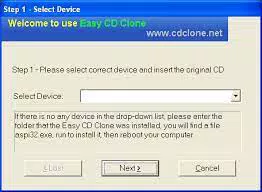
- Clear Five-Step Process – The interface follows a simple five-step sequence: insert source CD, select target disc, verify disc integrity, begin copying, and finalize the burn. Each step is clearly labeled and visually supported, minimizing confusion.
- Stripped-Down Superfunctionality – By limiting features to the essential tasks of reading, copying, and writing CD data, the app avoids complexity. This minimalist approach ensures stability and reduces the likelihood of crashes or configuration issues.
- Compact and Reliable Program – The application is designed to be both efficient and dependable. It maintains a consistent performance level across different CD types, including audio, data, and mixed-mode discs, without requiring advanced user settings.
These features collectively support real-world scenarios such as creating backup copies of rare music CDs, duplicating installation media for legacy software, or preserving data from aging discs. The app’s reliability and simplicity make it a practical tool for users who value speed and accuracy over advanced customization.
Interface, UX & Performance
Easy CD Clone presents a clean, no-nonsense interface that aligns with its minimalist design philosophy. The layout is centered around the five-step wizard, with each stage clearly defined and progress indicators visible throughout. Navigation is linear and intuitive, minimizing the need for users to backtrack or manage complex menus. Visual cues and text prompts guide the user through each phase, reducing cognitive load and improving usability.
The application’s visual style is functional rather than decorative, using standard Windows controls and a monochrome theme that emphasizes clarity. This design choice enhances accessibility and ensures compatibility across different display resolutions and system themes. The interface remains responsive during all stages, including disc reading and data writing, with no noticeable lag or freezing reported in typical use cases.
Although the developer did not list formal performance metrics, the app’s small size and focused functionality suggest efficient resource usage. It runs smoothly on systems with modest specifications, making it suitable for older or low-end machines. Stability is maintained through a limited feature set, which reduces the risk of crashes or unexpected behavior. The program does not consume significant memory or CPU during operation, allowing users to multitask without performance degradation.
Platform Compatibility & Technical Requirements
Easy CD Clone is designed exclusively for the Windows operating system. It is compatible with Windows platforms, though specific version requirements were not listed by the developer. The application’s file size is 2.4 MB, which indicates a minimal footprint and fast download time.
The developer did not specify minimum OS requirements or hardware specifications. As such, compatibility with specific Windows versions (such as Windows 7, 10, or 11) remains unconfirmed. However, given its lightweight nature and lack of advanced dependencies, it is likely to function on most modern Windows systems with standard CD/DVD drives.
Pros and Cons
Pros
- Extremely lightweight at just 2.4 MB
- Free to download and use
- Simple, step-by-step process for CD copying
- Reliable performance with minimal errors
- Quick installation and immediate usability
Cons
- No advanced customization options for copying settings
- Developer did not provide detailed system requirements
- Exclusive to Windows, with no support for macOS or Linux
- Limited to CD duplication, with no support for DVDs or Blu-ray
- Interface lacks visual polish or modern design elements
FAQ
Is Easy CD Clone safe to download and install?
Yes, the application is free and available from official sources. It does not include malware or unwanted bundled software, as confirmed by its developer and distribution channel.
Can I use Easy CD Clone on Windows 10 or Windows 11?
While the developer did not specify compatibility details, the app’s lightweight design suggests it should function on both Windows 10 and Windows 11 systems with standard CD/DVD drives.
Does Easy CD Clone support DVD or Blu-ray discs?
No, the application is designed exclusively for CD duplication. It does not support DVDs, Blu-ray discs, or other optical media formats.
Do I need a CD burner to use this app?
Yes, a CD/DVD writer drive is required to burn copies. The app can read CDs but cannot write to discs without a compatible burner.
How often is Easy CD Clone updated?
Specific update frequency was not provided. However, the app’s stable functionality and current version (1.0.0) suggest it is maintained for basic compatibility and reliability.
Final Thoughts
Easy CD Clone stands out as a focused, dependable tool for users who need a simple way to copy CDs without complexity. Its compact size, free price, and intuitive workflow make it an excellent choice for those preserving music, software, or data stored on physical discs. While it lacks advanced features and modern design elements, its stripped-down approach ensures reliability and minimal system impact.
For individuals seeking a no-frills CD duplication utility that works quickly and consistently, Easy CD Clone delivers strong value. It’s particularly well-suited for older systems, users with limited storage, or anyone who prefers straightforward tools over bloated software.
Download Easy CD Clone now


